FAQ
When there is inaccurate measurement of the transformation ratio, the following measures can be taken:
On the premise of ensuring non instrument related issues (such as hardware failures), the following measures can be taken to solve them:
- Check for poor contact on the test wire and replace it if necessary (sometimes a multimeter alone cannot guarantee the integrity of the test wire).
- Disconnect the primary circuit and secondary load of CT.
- Check if P1 or S1 of the CT is grounded. Due to both P2 and S2 being grounded inside the instrument, P1 and S1 on the sample side cannot be grounded.
- Short circuit the non subject CT winding that shares the same primary circuit with the subject CT. For the CT inside the transformer bushing, please refer to the wiring diagram below:
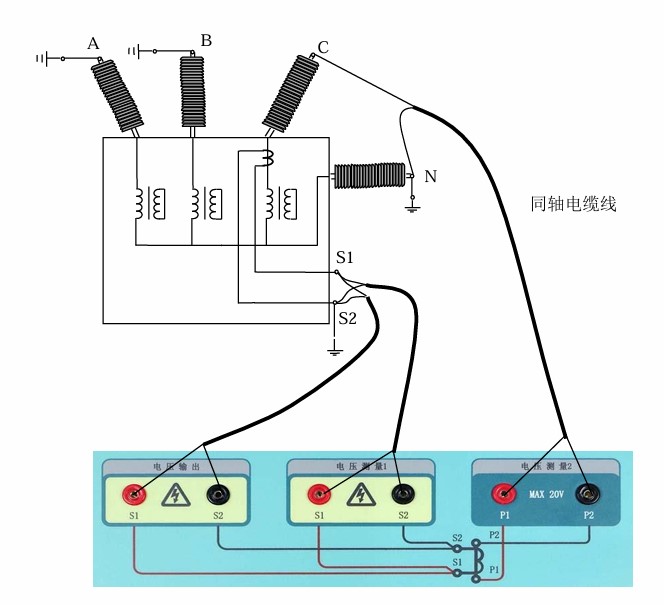
- For through type CT with air gap, try to pass the test line through the center of the CT as much as possible.
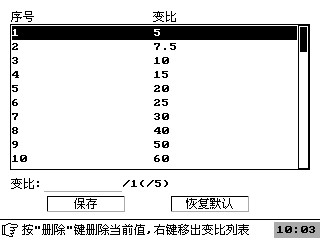
- If the measured turn ratio is correct, but the transformation ratio does not match the CT nameplate, please check if this CT transformation ratio is in the standard transformation ratio list supported by the instrument and add it as needed. The operation method is as follows
- System Settings – Ratio List – Add the Ratio. Enter the new variable ratio value at the cursor, press the confirm button to add it to the variable ratio list (please be sure to press the confirm button first), move the cursor to save after adding, and then press the confirm button to save.