

FAQ
● The XC355 analogue rotary sensor has a built-in dead zone (effective range 345° ±2°). Before use, position the sensor so the on-screen cursor is close to the center division. On new units the white index line on the knob shows cursor position for quick alignment; if the knob is loose, ignore it and use a centered cursor on the instrument display as the sole installation reference.
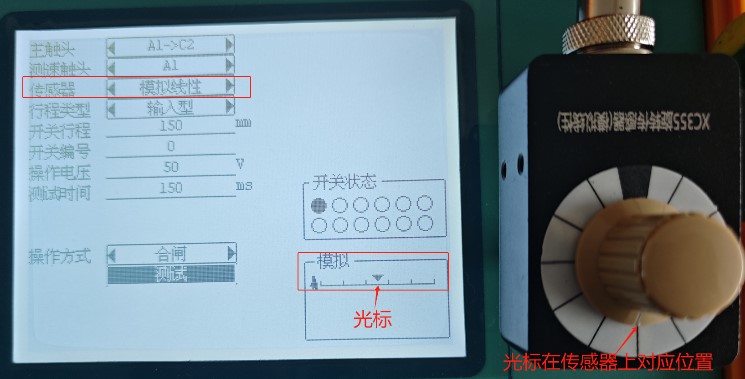
● For 4-pin analogue sensors such as XC355 rotary or ABB M23 linear: if no curve appears or the cursor fails to follow the wiper, first confirm “Analog / Analog Linear” is selected. Then, with a multimeter on Ω range, check the potentiometer: connector pins 1 = +V, 2 = wiper, 3 = –V, 4 = spare. A healthy sensor satisfies R₁₋₂ + R₂₋₃ = R₁₋₃.
● If the sensor passes the self-test, inspect the cable connector solder joints for looseness. With a multimeter on Ω range, measure end-to-end resistance between the two plugs: 1-1, 2-2, 3-3; each line should read ≈1 Ω. If no pin adapter is available, plug in any other analogue sensor and move its wiper—check whether the cursor on the instrument screen follows. (The chance of two different sensors failing at once is very low.)
● A50 accelerometer (select “Accelerometer”) and GT1 gyroscope (select “Gyroscope”): after connecting to the instrument and choosing the correct sensor type, the cursor should sit at mid-scale and remain fixed while the breaker moves. If the cursor is off-center, first check the sensor cable for damage; if the cable is good, the sensor itself is likely faulty.